Chat with the machines on your network, no account needed
Send messages, Markdown and files of any size straight between the computers on your Wi-Fi or tailnet, with no account and no server in the middle.
· 7 min read · 1MachineTool Team
You're at the desk with the laptop, and the log you need is on the NUC in the next room. Or a colleague two metres away needs the 800 MB build you just made. The computers sit on the same Wi-Fi, but moving a few words or a file between them still means a detour: email it to yourself, paste it into a messaging app that sends it through a server on another continent, open a cloud folder and wait for it to sync, or walk over with a USB stick.
None of those are built for machines that are already next to each other. They want an account, they upload what you send, and most of them shrink or refuse a file that's too big. For a code snippet, they turn your formatting into a wall of text.
What changed
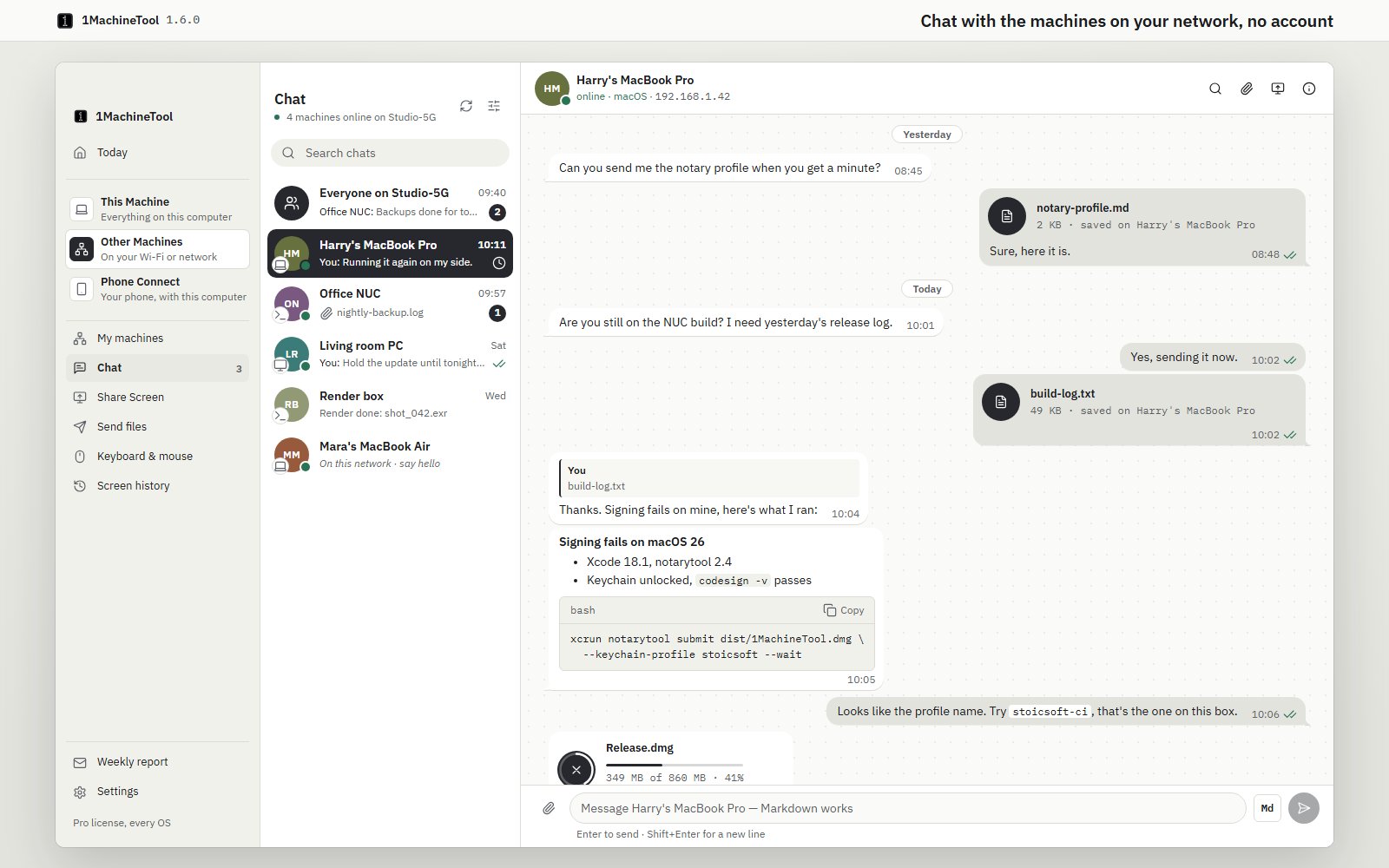
1MachineTool 1.6 adds Chat: a chat between the computers on your network that run 1MachineTool. Now you can send a message, a code block or a file of any size from one machine to another without an account, without a server and without it leaving your network.
How it works in practice
Every machine on your network is already in the list
Open Other Machines › Chat. On the left are your chats: a room for every machine on the network at once (named after the network, like "Everyone on Studio-5G"), then the machines you've talked to, newest first, then machines found on the network that you haven't messaged yet, each with a "say hello". The list comes from the same scan Share Screen uses, so a Mac, a Windows PC and a Linux box on the same Wi-Fi or tailnet all show up without any setup.
If a machine is on a network the scan can't see, add it by its address from the list's menu.
Messages go straight from one machine to the other
There is no 1MachineTool server in the middle. A message travels directly from your computer to the other one, sealed so only those two machines can read it. Each machine makes its own keys the first time Chat runs, and the first message between two machines saves the other one's key. If a machine ever shows up with a different key, Chat refuses its messages and shows a banner with the new fingerprint until you decide to trust it.
You also choose who can reach you. In the list's menu, set this computer to accept messages from anyone on this network, the default, or only from machines you've paired in Share Screen or My machines.
Write it the way you'd write a README
Messages are Markdown. Code blocks keep their formatting and get a Copy button, and tables, checklists, quotes and links show up as they should. Press Md to switch the composer to Write and Preview, so you can check a table or a long command before you send it. Enter sends and Shift+Enter starts a new line.
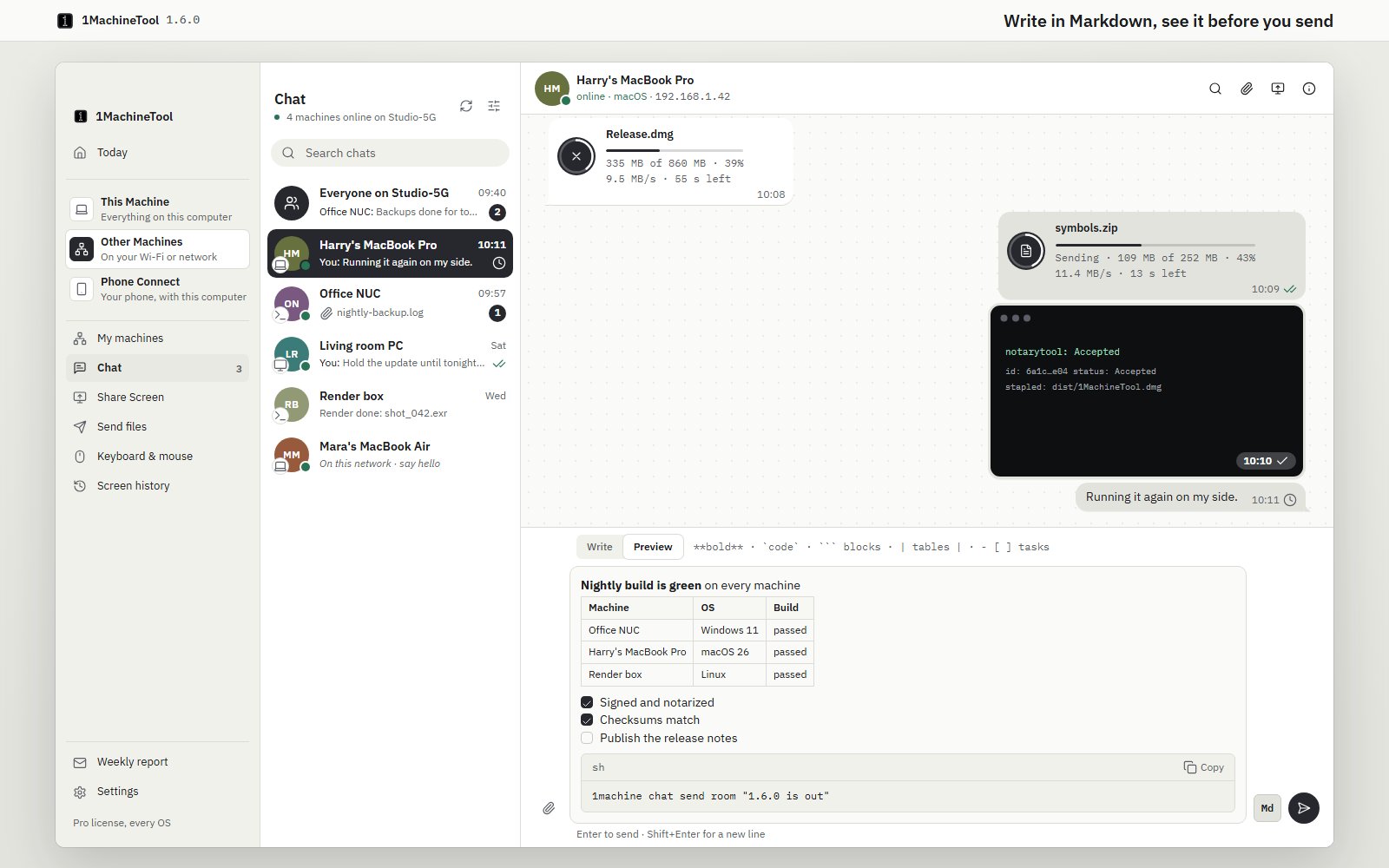
So when a teammate asks what you ran, you paste the command as a code block, and they copy it back out with one click, with no smart quotes, no lost line breaks and no screenshot of a terminal.
Send the big file, and watch it arrive
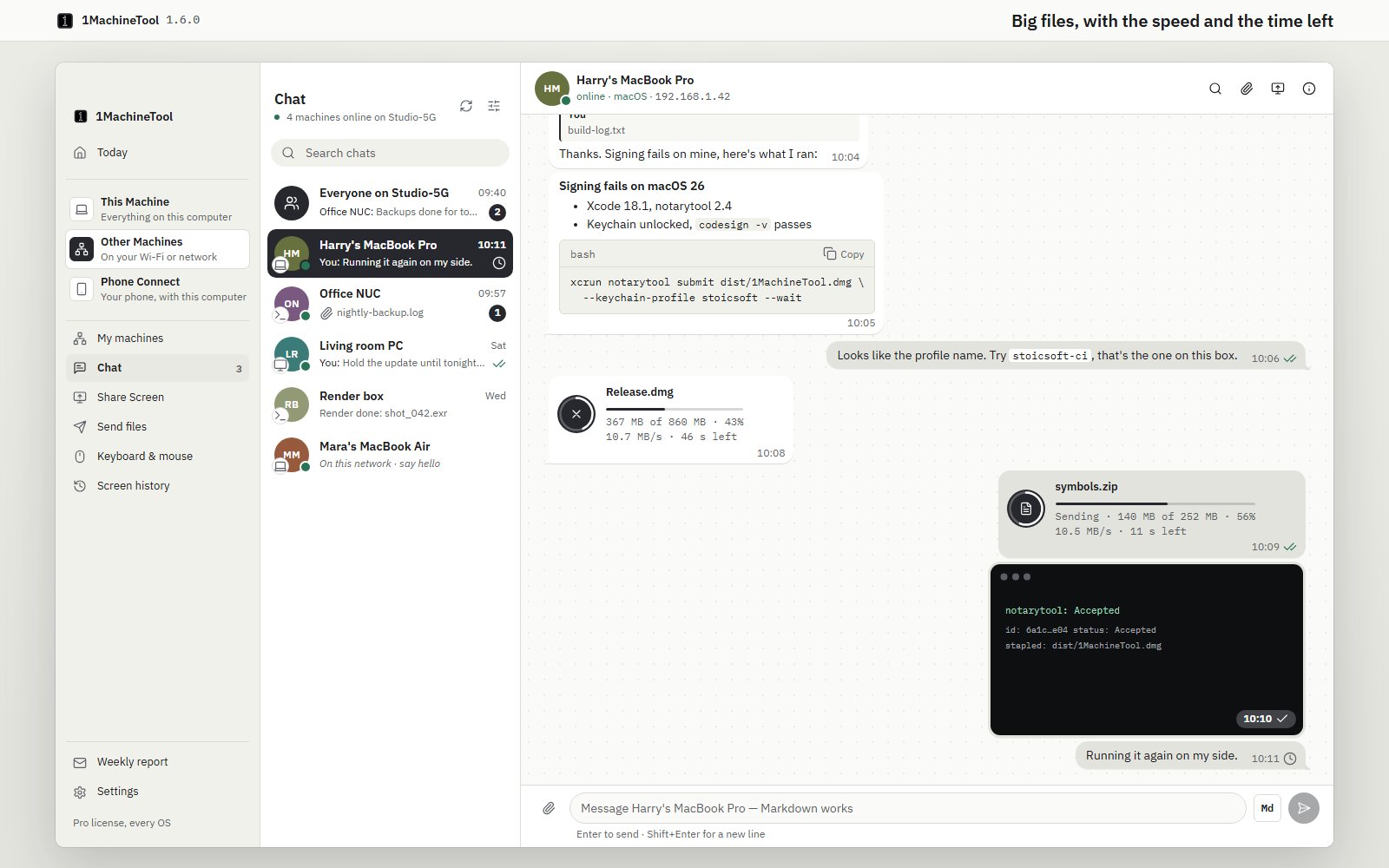
Drop a file on the chat, paste it, or use the paperclip, and add a caption if you like. Files of any size go, straight from one machine to the other. Images up to 10 MB show up in the chat by themselves; anything else downloads when the other person clicks it, into Downloads/1MachineTool.
While a file moves, both sides see it: a ring on the icon, a bar, how many megabytes are done, the speed and the time left. The receiver can stop a download with the ×, and the file stays on offer so they can try again. When it's done, your bubble says the file was saved on the other machine, so you know it arrived without having to ask.
Ticks, replies, and messages that wait for a sleeping machine
One check means the message reached the other machine, and two mean it was read. If the other computer is asleep or out of the office, your message waits and goes out when it's back, so you don't have to remember to send it again. You can reply to a specific message, search a chat, mute one that's noisy, or clear it.
Chat from the terminal and from your AI tools
Everything works without opening the window. 1machine chat lists your chats, reads them, sends text and files, and downloads what someone sent you. 1machine chat listen runs Chat on a machine where the app isn't open, such as a headless box in a closet, and prints what arrives. Your AI tools get Chat through 1machine mcp, and they have to ask before they send a message on your behalf.
That makes the build box useful in a new way: a script that ends with 1machine chat send tells everyone in the room that the nightly build is done.
Your phone joins in too
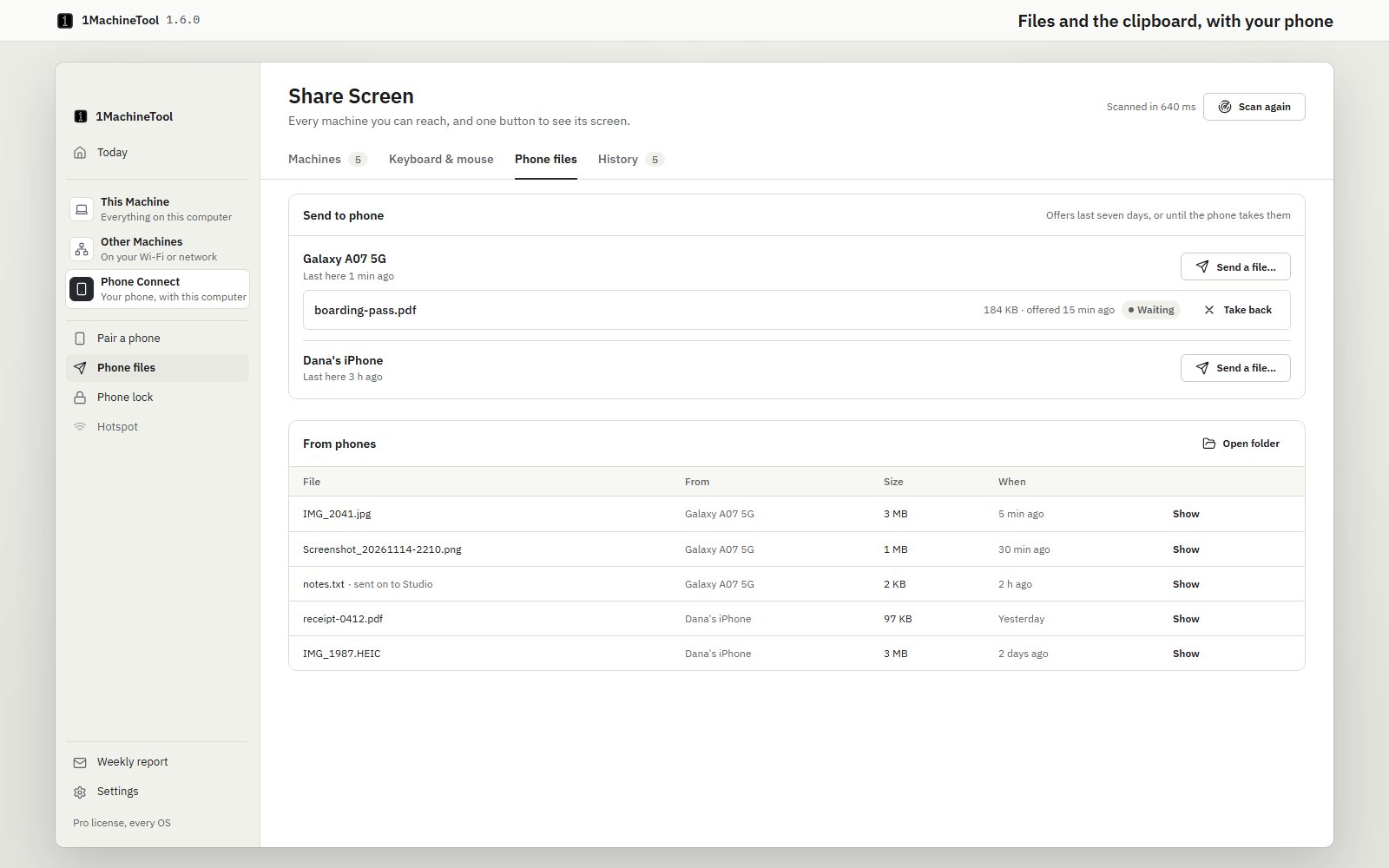
A phone paired in Phone Connect can now send its clipboard to this computer and take this computer's clipboard, and send files that land in Downloads/1MachineTool. Going the other way, Phone Connect › Phone files sends a file to a phone, lets you take an offer back if you change your mind, and lists everything phones have sent. Every clip and file that arrives is a notification, so nothing lands silently.
Before vs after
| Before 1.6 | With 1.6 | |
|---|---|---|
| Sending a note to the next machine | Email or message yourself through a cloud service | Open Chat; the machine is already in the list |
| Account needed | Yes, often on both machines | None: a machine is its own identity |
| Where the message goes | Through someone's server | Straight from one machine to the other, sealed |
| Sharing a command | Formatting lost, or a screenshot of the terminal | A Markdown code block with a Copy button |
| A 900 MB file | Upload limits, a cloud folder or a USB stick | Drop it in the chat and watch the speed and time left |
| The other machine is asleep | Remember to send it again later | The message waits and goes when it's back |
| Phone to computer | Email the photo to yourself | Send it from the phone; it lands in Downloads/1MachineTool |
Who benefits most
People with a desk full of machines. A laptop, a Windows box for testing and a Linux server under the desk now share one chat, so logs, commands and builds move between them without a detour through the internet.
Small teams in one office. Everyone on the same Wi-Fi can drop a file or a snippet to the person across the room, with no workspace to set up and nothing stored on someone else's server.
Anyone who scripts their machines. 1machine chat send and 1machine chat listen turn a build or backup job into something that reports back to you, and an AI tool can do the same once you allow it.
Also in 1.6
- The launcher finds your Windows apps, from the Start menu and the Store, and opening an app or file from it on Windows no longer reports a failure when it worked.
- Snippets with
{clipboard}work on Windows. - Apps you installed since the last time show up as soon as you open the launcher, on every OS, and "Open 1MachineTool" brings up the main window.
Try it
Update 1MachineTool on two of your computers, open Other Machines › Chat on one, and say hello to the other. The next time a file or a command needs to cross the room, it goes straight there, and you can watch it arrive.