Replace ten Mac utilities with one app that explains itself
1MachineTool 1.0 puts the launcher, clipboard, monitor, cleaner, power and battery tools into one app, and answers why your Mac is slow, hot, full or draining with a fix you can undo.
· 6 min read · 1MachineTool Team
Look at the right side of your menu bar. A launcher, a clipboard manager, a window snapper, a system monitor, a cleaner, something that keeps the Mac awake, something that stops the battery charging past 80%. Each one was a good idea on the day you installed it. Together they are ten updates, ten settings windows, often ten bills, and ten icons fighting the camera notch for space.
The worse part is that none of them talk to each other. Your monitor can see that something has been eating CPU for two hours. Your cleaner has no idea. Your keep-awake app doesn't know that a browser tab is already holding the Mac awake. When the fans spin up, you still end up opening Activity Monitor and guessing.
What changed
1MachineTool 1.0 puts those jobs into one app with one hotkey, and connects them. Now you can ask your Mac why it is slow, hot, full or draining, get one plain sentence back, and fix it with a single click you can undo.
Every module can be switched on or off on its own, so you only see the parts you use. Underneath, they share the same readings, which is what makes the answers possible.

How it works in practice
Ask why, and get an answer you can act on
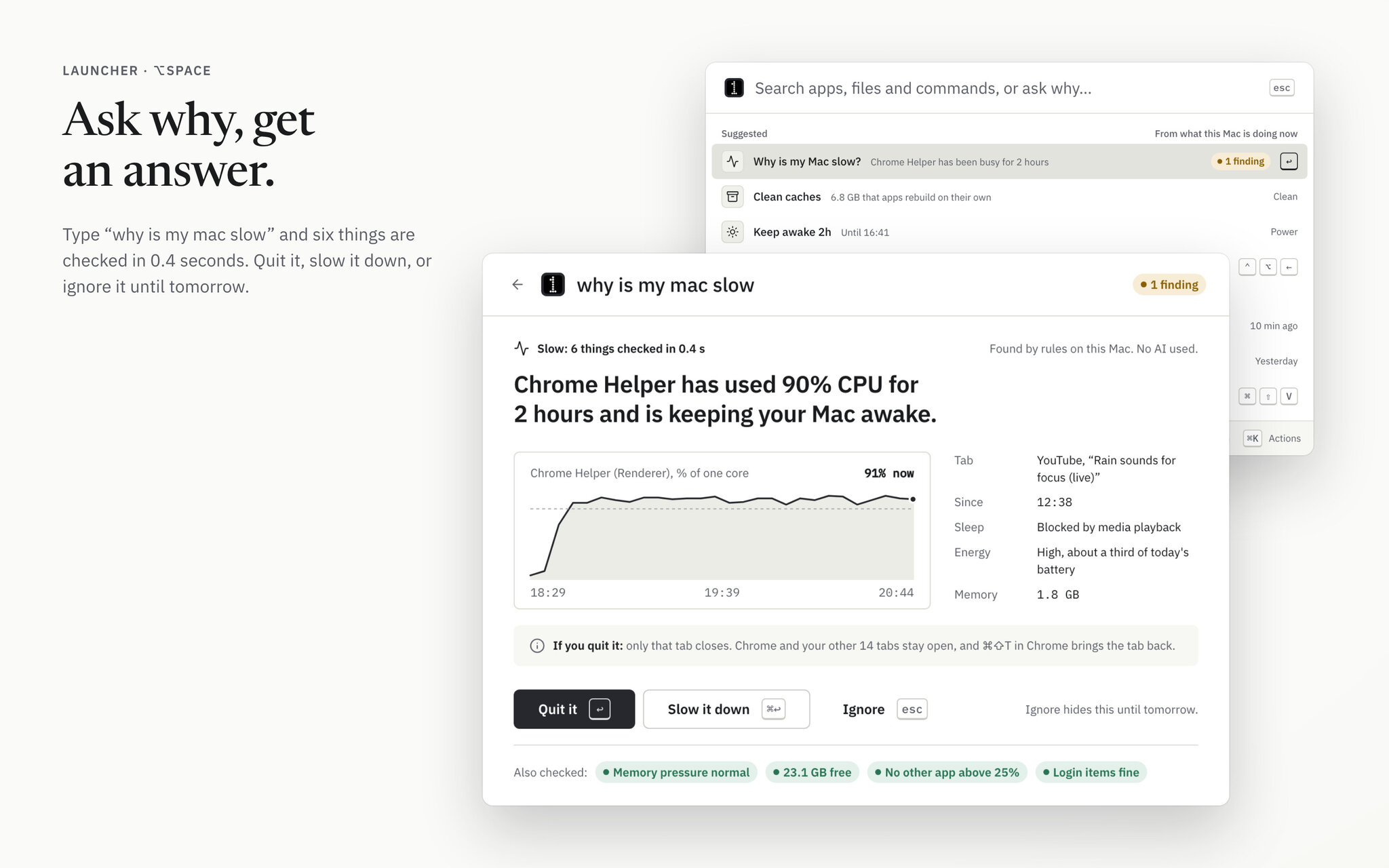
Press ⌥Space and type the question you would ask a friend: "why is my mac slow". 1MachineTool checks what it knows about the machine and comes back with a finding, not a chart. In the example below it found that a Chrome helper has used 90% CPU for two hours and is keeping the Mac awake, and it says which tab is behind it.
The finding comes with the evidence and the choices: quit it, slow it down, or ignore it until tomorrow. Before you pick, it tells you what each choice does. Quitting that helper only closes one tab, and Chrome can bring it back.
You can ask seven questions: why the Mac is slow, why it is hot, why the battery is draining, where the disk space went, why it won't sleep, why the Wi-Fi is bad, and what woke it. The answers come from rules that run on your Mac. No AI is involved unless you connect your own provider, and that is off until you do.
Free up space without deleting anything outright
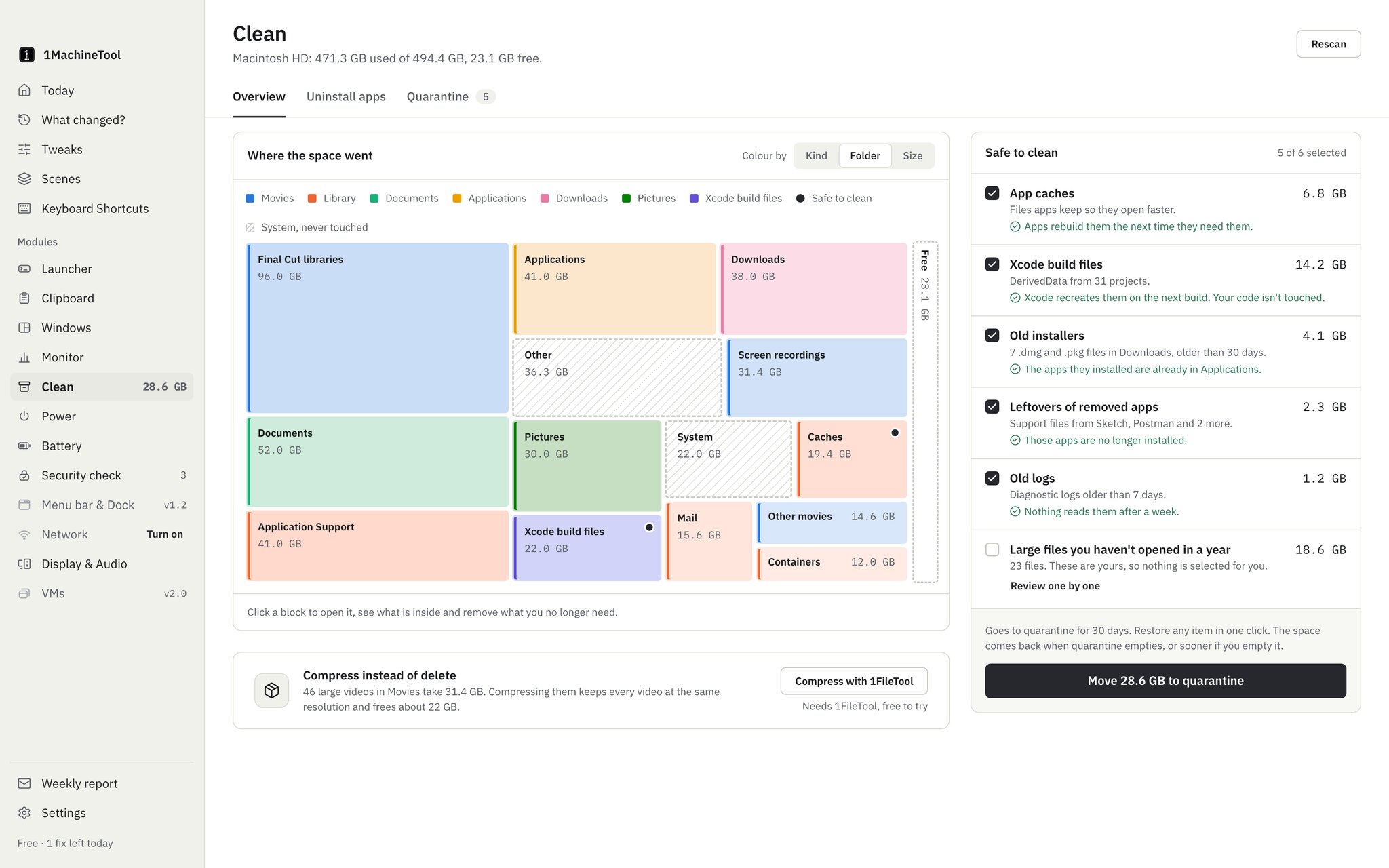
The Clean module draws a space map of your disk, so you can see at a glance that Final Cut libraries take 96 GB and Xcode build files another 22 GB. Next to the map is a short list of things that are safe to remove: app caches, Xcode build files, old installers, leftovers of apps you already removed, and old logs. Each line says why it is safe. Large files you haven't opened in a year are listed too, but never selected for you.
Nothing is deleted outright. Everything you remove goes to a quarantine for 30 days, and any item comes back with one click. The same applies to uninstalling an app with its leftovers and to the privacy sweep of caches and recent-items lists.
See what your Mac has been doing
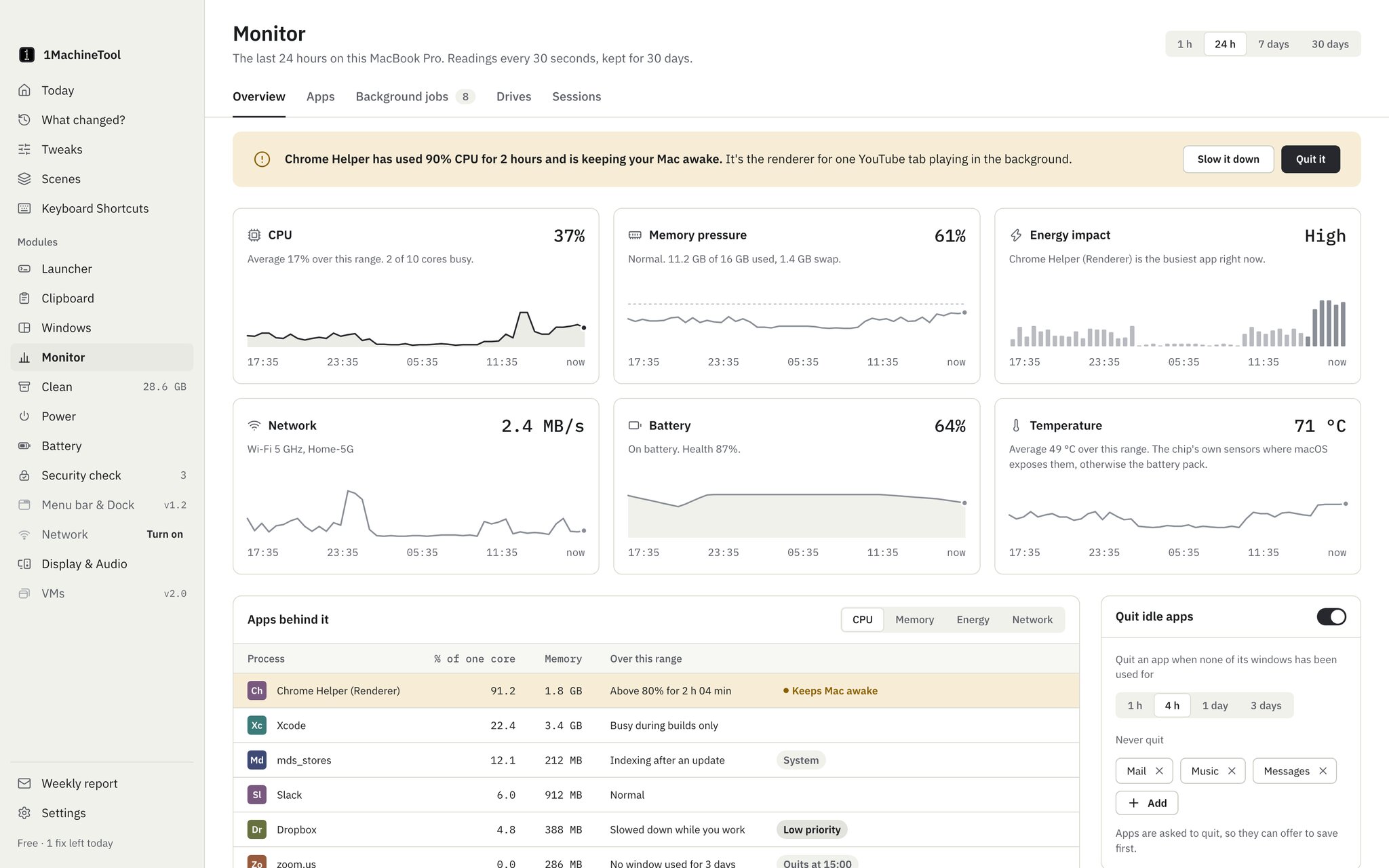
Monitor takes a reading every 30 seconds and keeps a month of history: CPU, memory pressure, energy, network, battery and temperature. Below the charts it names the apps behind each number, so "CPU was high at 2 pm" turns into "Xcode was building and a Chrome helper never stopped".
It also lists background jobs, checks drive health, records performance sessions, and can quit apps that have sat idle for hours, with a list of apps it must never touch. A readout in the menu bar, or around the camera notch, keeps the numbers one glance away.
Everything else you used to install separately
- Clipboard history for text, rich text, images, files, links and colours, encrypted on disk. Password fields and apps you ignore are never recorded.
- Windows: snap to halves, thirds and corners, move a window to the next display, and save layouts per display setup.
- Power and Battery: keep the Mac awake for a download or a talk, schedules, battery health and wear, and a charge limit through an optional helper you install with one admin prompt.
- Security check, Network, Display & Audio and Menu bar modules for the rest of the daily chores.
- Virtual machines on Apple silicon, for opening a file you don't trust somewhere it can't touch your Mac.
- The
1machineCLI and1machine mcp, so your terminal and your own AI agent can run the same diagnosis and fixes as the app.
Before vs after
| Task | Before | With 1MachineTool |
|---|---|---|
| The Mac is slow | Open Activity Monitor, sort by CPU, guess | Ask "why is my mac slow", read one sentence, click the fix |
| The disk is full | Run a cleaner and hope it didn't delete something you needed | See the space map, move safe items to quarantine, undo for 30 days |
| You copied it an hour ago | It's gone, unless you bought a clipboard manager | Search the encrypted clipboard history |
| Keep the Mac awake for a download | Another menu bar app | Keep awake from the launcher or the menu bar readout |
| Updates and settings | Ten apps, ten update prompts | One app that updates itself |
Who benefits most
People with a crowded menu bar. If you already pay for a cleaner, a monitor and a clipboard manager, 1MachineTool replaces them with one process and one icon, and the pieces finally share what they know.
Anyone on an ageing laptop. A full disk, loud fans and a battery that drains by lunchtime are exactly the questions it answers, with fixes you can take back.
Developers who work with AI agents. 1machine mcp gives Claude Code, Cursor or your own agent a safe way to diagnose the machine. Anything that changes it needs an explicit confirmation.
Try it
1MachineTool runs on macOS 13 or later. Download it from 1machinetool.com, switch on the modules you want during setup, and press ⌥Space. The first answer takes a few seconds, and from then on the app keeps itself up to date.