Tweaks · Everyday tools
The hidden settings, as switches, each with a reset.
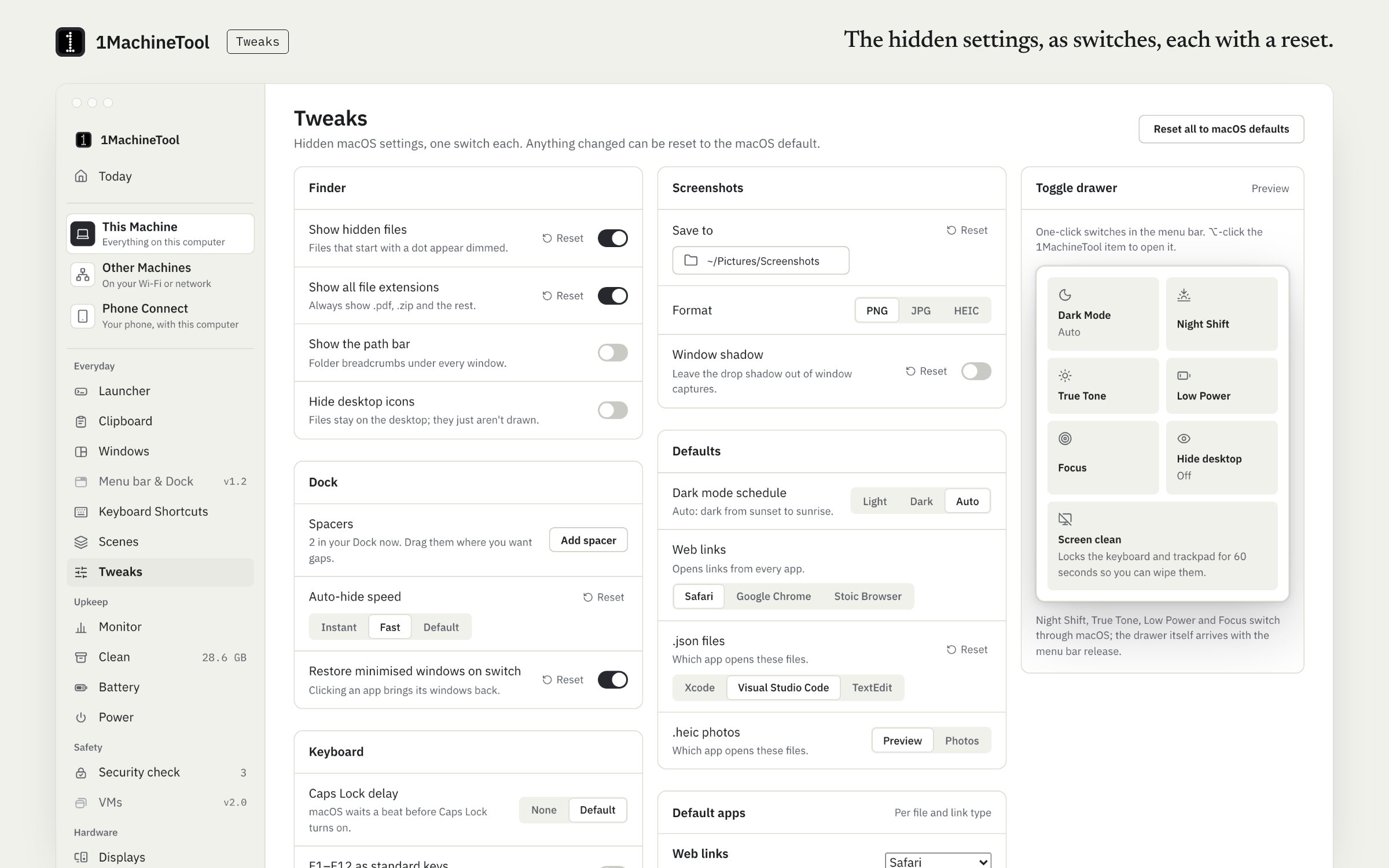
Tweaks puts the system settings that usually need a Terminal command on one page: 24 on macOS and 32 on GNOME. Each row has its own reset. On a Mac it also sets the default app for a file type or a link type.
Checked against 1MachineTool 1.7.0, 18 November 2026
What it does.
- Finder and files
- Show hidden files, all file extensions, the path bar and the status bar, or hide the desktop icons.
- Dock
- Hide the Dock automatically, change its slide-in speed, hide recent apps, minimise windows into their app icon or add a spacer.
- Keyboard
- Key repeat rate, the delay before repeat, F1–F12 as standard keys, and removing the Caps Lock delay.
- Screenshots
- Where screenshots are saved, their format, and whether a window screenshot keeps its shadow.
- Display modes
- Dark mode, Night Shift and True Tone.
- Default apps
- Choose the default app per file type and per link type, the default browser included.
- A reset on every row
- Any row goes back to the system default on its own.
How you use it.
- Open Tweaks.
- Flip a switch or pick a value.
- Use the row's reset to go back to the system default.
Free and Pro.
Free
Every tweak. Tweaks are not counted against a Free limit.
On your computer.
- macOS
- 24 macOS defaults with per-row reset, Night Shift and True Tone, and default apps per file type and link type.
- Windows
- Early build. The Tweaks page in the app says what works there today.
- Linux
- 32 GNOME settings through gsettings. On other desktops, the rows that are GNOME's own say so.
What it doesn’t do.
- It changes settings the system already has. It does not patch or modify the OS.
- Grayscale and True Tone are not offered on Linux.
- On Linux the rows are GNOME's; other desktops see a note on the ones that do not apply.
Questions.
How do I show hidden files on a Mac?
Press ⇧⌘. in Finder to show them for now, or switch on Show hidden files in Tweaks to keep them shown. The row's reset hides them again.
Are the tweaks reversible?
Yes. Every row has its own reset, which puts that setting back to the system default.
Is Tweaks free?
Yes. Tweaks are part of Free and are not counted against a daily limit.
Can I change the default app for a file type?
Yes. On a Mac, Tweaks sets the default app for a file type or a link type, the default browser included, from one list.