Menu bar & Dock · Everyday tools
Hide the menu bar icons you never click.
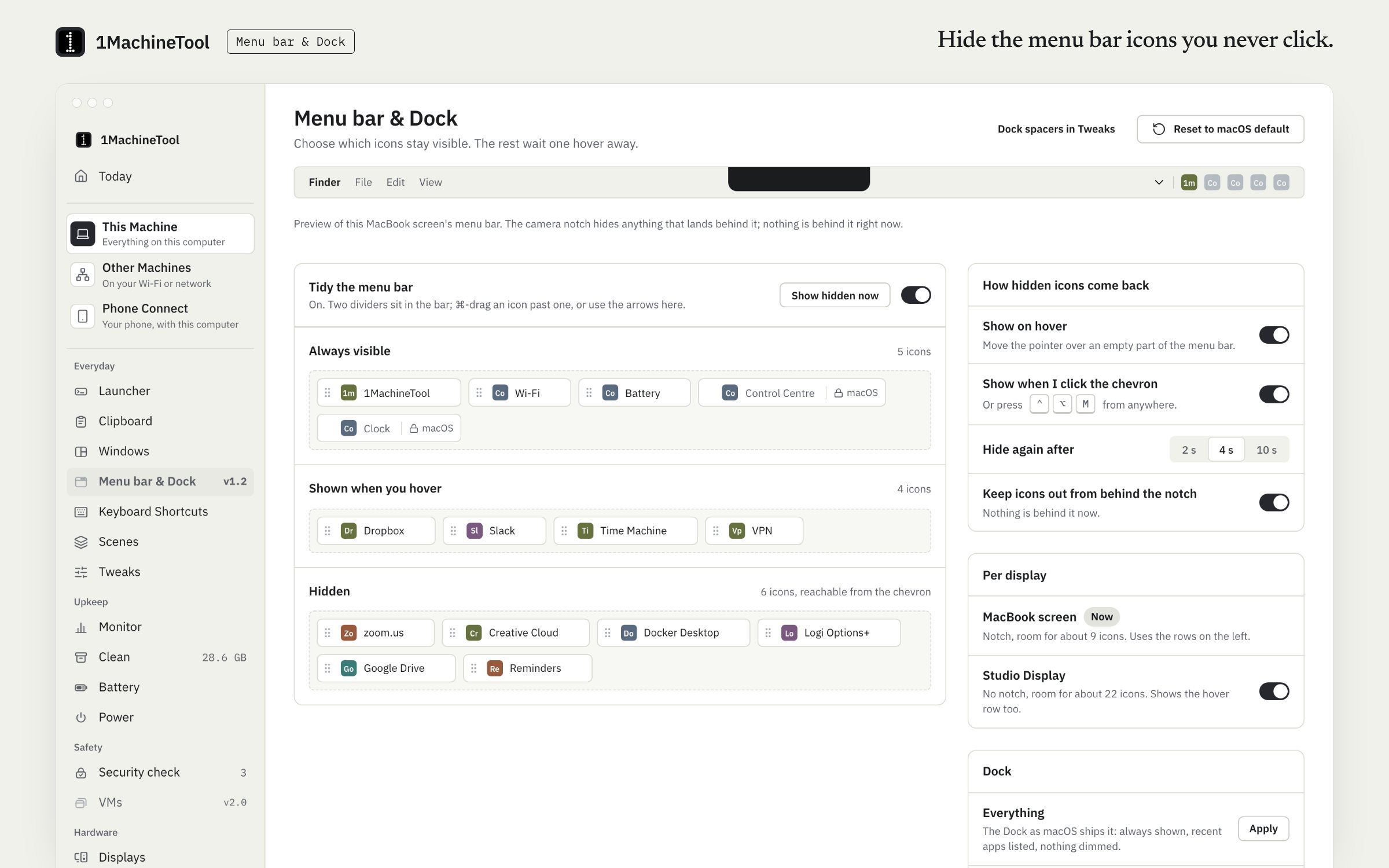
Menu bar & Dock sorts your Mac's menu bar icons into three rows: always shown, shown on hover, and hidden. Hidden icons come back with a hover, a click on the chevron or ⌃⌥M. The rows are free; Pro moves the icons for you and adds Dock presets.
Checked against 1MachineTool 1.7.0, 18 November 2026
What it does.
- Three rows
- Always shown, shown on hover, and hidden. 1MachineTool's own dividers on the bar mark where each row starts.
- Bring hidden icons back
- Hover over the menu bar, click the chevron or press ⌃⌥M.
- Your real icons, listed
- With Accessibility allowed, the page reads the icons on your bar and shows which row each one is in.
- Icons moved for you
- With Pro, pick a row for an icon and 1MachineTool performs the ⌘-drag. On Free you hold ⌘ and drag the icon past the divider yourself.
- Notch and displays
- It knows where the camera notch is, and works per display.
- Dock presets
- With Pro, apply a Dock preset or put the Dock's icons in a new order. The Dock relaunches for a second, and Undo restores what you had.
How you use it.
- Turn on menu bar tidying on the Menu bar & Dock page. Its dividers appear on the bar.
- Allow Accessibility so the page can read your icons.
- Hold ⌘ and drag icons past a divider, or with Pro choose a row and let 1MachineTool move them.
- Hover, click the chevron or press ⌃⌥M to see the hidden rows.
From the terminal
1machine menubar status- Says whether tidying is on and what is in each row.
1machine menubar toggle- Shows or hides the hidden rows.
Free and Pro.
Free
The three rows, show on hover, the chevron and the hotkey. You drag the icons into place yourself.
Pro
Icons moved into rows for you, and Dock presets with undo.
$29 once for one computer, $59 for three, $89 for fiveOn your computer.
- macOS
- Three rows, real icons read over Accessibility, the ⌘-drag done for you, show on hover, chevron or ⌃⌥M, notch awareness, per display, and Dock presets with undo.
- Windows
- Early build. Arranging the Dock is a macOS feature, and the page in the app says what is available on Windows.
- Linux
- Menu bar tidying is not offered: the GNOME top bar has no app icons to move. Ubuntu Dock presets are.
What it doesn’t do.
- Reading and moving icons needs the Accessibility permission.
- macOS keeps Control Centre, Clock and Siri where they are.
- No triggers, profiles or scripting.
Questions.
Is hiding menu bar icons free?
Yes. The three rows, show on hover, the chevron and the ⌃⌥M hotkey are free; you drag the icons into place yourself with ⌘. Pro moves icons for you and adds Dock presets.
Why does it need Accessibility?
To read which icons are on your menu bar and to move them. It asks once, when you turn the module on. Until then you can still hold ⌘ and drag an icon past the divider yourself.
Does it work with the notch?
Yes. It knows where the camera notch is on a MacBook display, and it works per display.
Can it hide Control Centre or the clock?
No. macOS keeps Control Centre, Clock and Siri where they are, and the page shows them as locked.