Devices · Other machines
Link your computers over SSH without copying a key.
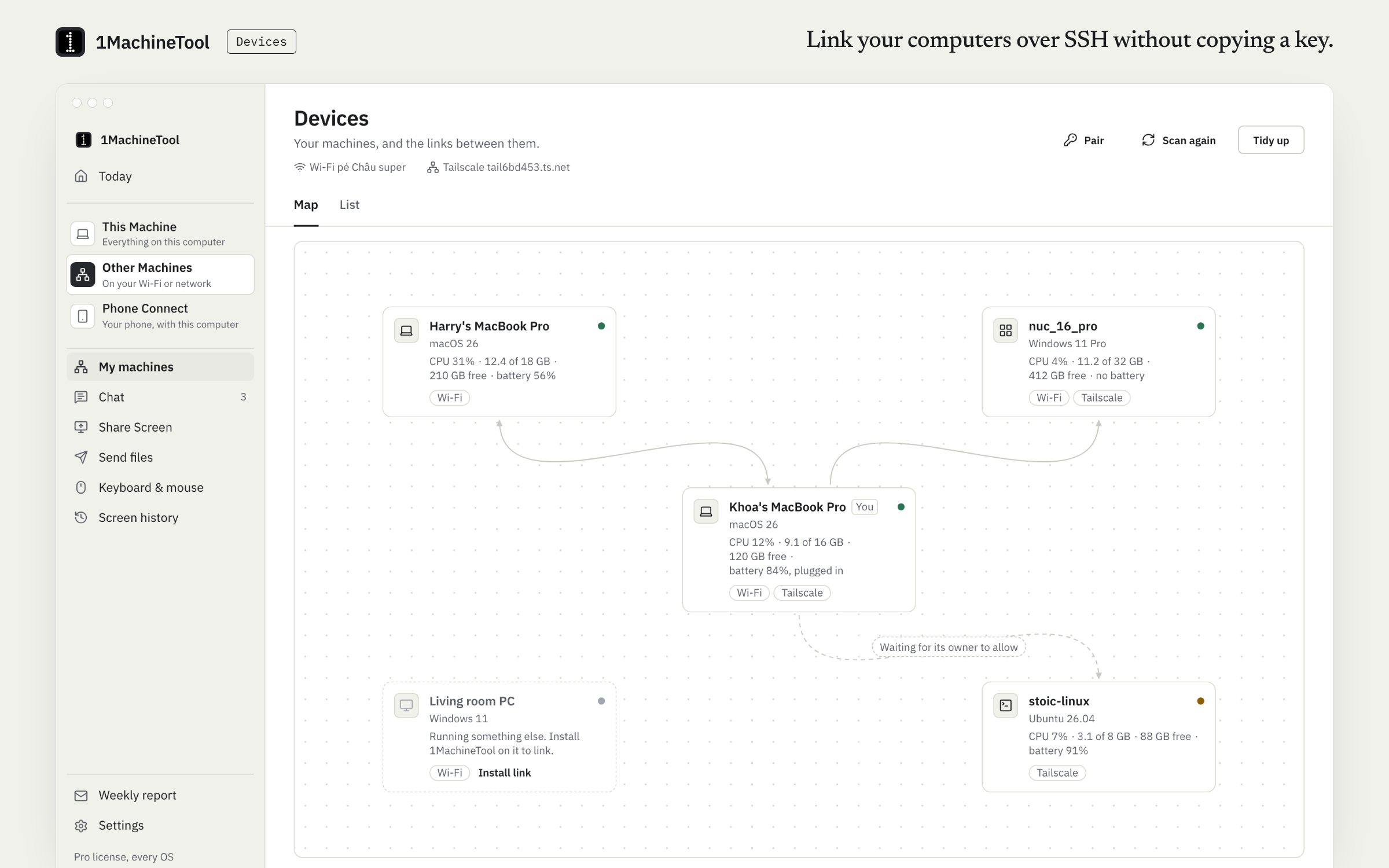
Devices shows your machines that run 1MachineTool on the same Wi-Fi or Tailscale network, as a map and a list with their health. Drag one onto another to link them: it sets up SSH for you, keys and all, once the other machine's owner allows it. After that, `ssh <name>` works in any terminal, both ways.
Checked against 1MachineTool 1.7.0, 18 November 2026
What it does.
- Your machines, with health
- A map and a list of your machines. A paired machine's card shows its CPU, memory, disk, battery and uptime.
- Drag to link
- One ed25519 key per machine is exchanged over the paired, encrypted channel after the other owner allows it. No key to copy and no file to edit.
- Plain ssh afterwards
- `ssh <name>` works in any terminal from then on, in both directions.
- Terminal, command, files, wake
- Each link opens a terminal, runs one command, sends files or folders, or wakes a machine that is asleep.
- Unlink removes exactly what it added
- Authorized keys, known hosts and Host blocks are edited by marked line only, so unlinking puts the files back as they were.
- Headless machines
- `1machine devices serve` lets a server or a Linux box without a desktop take part.
How you use it.
- Open Devices under Other Machines. Machines running 1MachineTool on your network appear on the map.
- Drag one machine onto another.
- Allow the link on the other machine.
- Type `ssh <name>` in any terminal, or use the link's buttons.
From the terminal
1machine devices list- Your machines and the links between them.
1machine devices link <machine>- Link this machine with another; its owner allows it there.
1machine devices ssh <machine>- Open a terminal logged in to a linked machine.
1machine devices run <machine> <command>- Run one command on a linked machine (Pro).
1machine devices send <machine> <files>- Send files or folders to a linked machine (Pro).
1machine devices serve- Let a headless machine pair and link without the app.
Free and Pro.
Free
Link 2 machines, open a terminal on them and wake them.
Pro
No limit on links, plus running commands and sending files to linked machines.
$29 once for one computer, $59 for three, $89 for fiveOn your computer.
- macOS
- The map, the list, linking, terminals, commands, files and wake.
- Windows
- Verified between a Windows 11 PC and an Ubuntu laptop: linking both ways, plain ssh both ways, commands and files both ways, and unlinking back to the original files. The Windows administrators' key file and its permissions are handled.
- Linux
- The same, on the desktop or headless through `1machine devices serve`.
What it doesn’t do.
- Both machines need 1MachineTool, on the same Wi-Fi or the same Tailscale network.
- The other machine's owner has to allow the link.
- The machine you log in to needs its SSH server on. `1machine devices ssh-server` shows it, and `on` turns it on.
Questions.
How do I set up SSH between two of my computers?
Install 1MachineTool on both, open Devices and drag one onto the other. After the other machine allows it, the keys, known hosts and Host entries are in place and `ssh <name>` works both ways.
What does linking change on my computer?
It adds marked lines to your authorized keys, known hosts and SSH config, and one ed25519 key per machine. Unlink removes exactly those lines.
Can a server without a screen take part?
Yes. Run `1machine devices serve` on it. It runs the peer service in the foreground so other machines can pair and link with it.
Is Devices free?
Free links 2 machines and opens terminals on them. Pro has no limit and adds running commands and sending files.