How do I control a Windows PC from a Mac?
Updated 18 November 2026
Short answer
Turn on Remote Desktop on the PC (Settings › System › Remote Desktop), then connect from the Mac with Microsoft's free Windows App. The PC needs Windows Pro for this, and both computers must be on the same network or the same VPN. 1MachineTool finds the PC and opens the connection for you.
Your options.
Remote Desktop and Windows App
Microsoft's own route. The PC shares its screen over Remote Desktop and the Mac connects with Windows App from the Mac App Store. The PC must run a Pro, Enterprise or Education edition of Windows.
Best whenBest when the PC runs Windows Pro and both computers are on your network.
A remote-access service
Services such as TeamViewer install an app on both computers and connect them through an account with the vendor.
Best whenBest when the PC is on another network and you can't set up a VPN.
A VPN, then Remote Desktop
A private network such as Tailscale gives the PC an address your Mac can reach from anywhere. Remote Desktop then works as if both were at home.
Best whenBest when you want your own PC from outside the house without opening a port.
1MachineTool's Share Screen
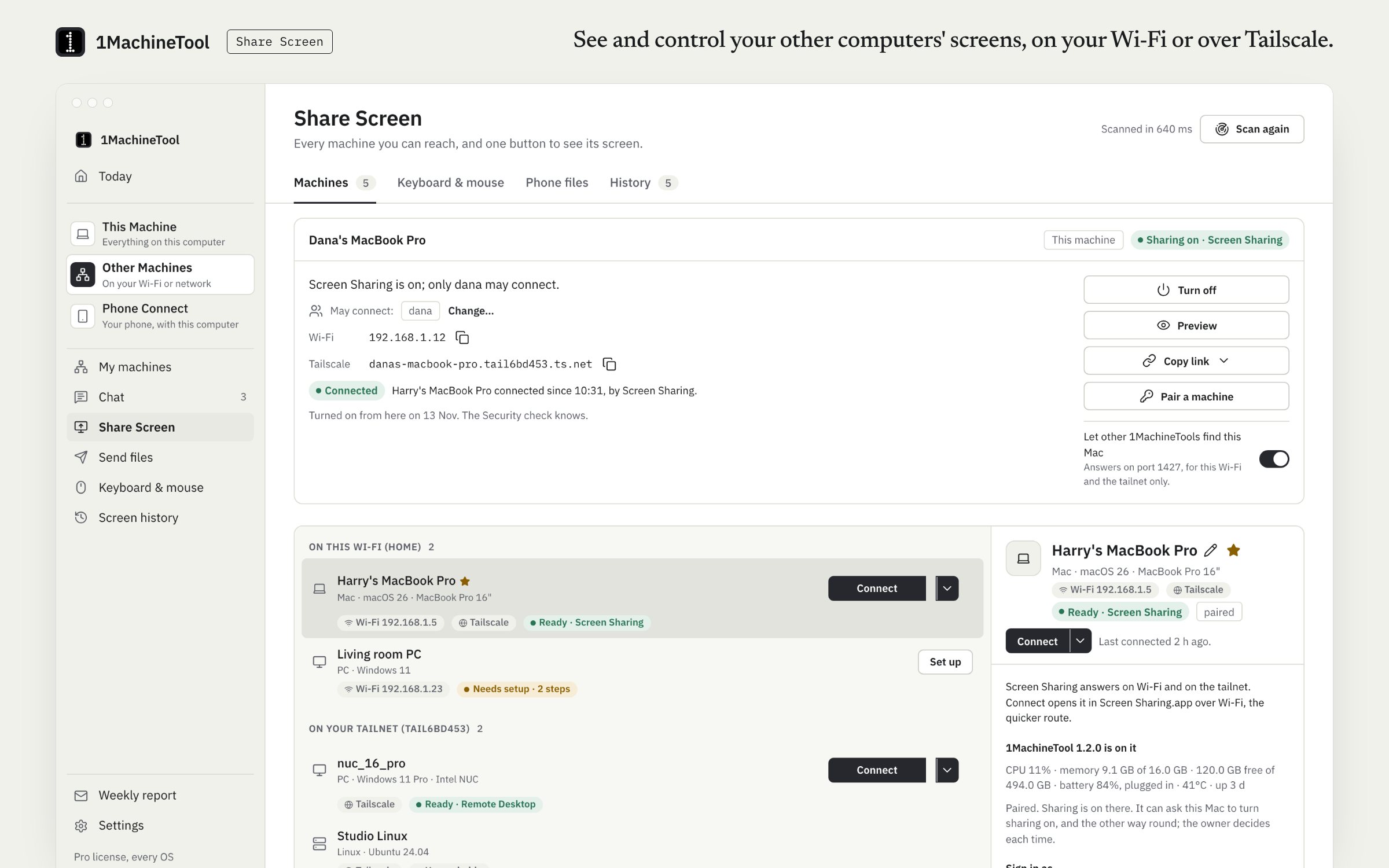
One list of every Mac and PC on your Wi-Fi and your Tailscale network, whether each can show its screen, and one Connect button.
Best whenBest when you have several machines and don't want to remember names and addresses.
Set up Remote Desktop by hand.
Turn on Remote Desktop on the PC
On the PC, open Settings › System › Remote Desktop and switch it on. Note the PC name shown on that page.
Check the account
You sign in with a Windows account that has a password. If the PC name doesn't resolve from the Mac later, use its IP address; this prints it in a Command Prompt on the PC.
ipconfigInstall Windows App on the Mac
Get Windows App from the Mac App Store. It is Microsoft's Remote Desktop client under its newer name.
Add the PC and connect
In Windows App, add a PC, type its name or IP address and connect. Enter the Windows user name and password when asked.
From outside your network
Put both computers on the same VPN and connect to the PC's VPN address. Don't forward the Remote Desktop port from your router to the internet.
The same job in 1MachineTool.
Share Screen scans your Wi-Fi and your Tailscale network and lists every Mac and PC with whether it can show its screen, and the steps to set up the ones that can't. Connect opens the PC in Windows App. With Pro it opens inside 1MachineTool's own viewer, with the user name and password saved in the Keychain.
- When both computers run 1MachineTool and are paired with a six-digit code, Pro opens the PC through 1MachineTool's own host: no Windows App, and no Remote Desktop to switch on.
- The viewer's menu sends Ctrl+Alt+Del and switches to view only.
- Over Tailscale it says when the path is relayed, and starts on lighter settings.
- In a terminal, 1machine screen list prints the same machine list.
Free lists your machines and connects to 2 of them through the system's own client. Pro has no limit and adds the built-in viewer and 1MachineTool's own host.
In the launcher
connect to studio pc
In the terminal
1machine screen connect studio-pc --rdp1MachineTool 1.7.0
On Windows and Linux.
It works the other way round too. A Mac shares its screen from System Settings › General › Sharing › Screen Sharing, and the Windows and Linux builds of 1MachineTool include the same machine list and the built-in Remote Desktop viewer. One gap: GNOME Remote Desktop on Linux needs a graphics mode the viewer does not speak yet, and the app says so.
Questions.
Does Remote Desktop work with Windows 11 Home?
Not as the computer being controlled. Windows Home can connect to other PCs but can't share its own screen over Remote Desktop; that needs Pro, Enterprise or Education.
Is Windows App the same as Microsoft Remote Desktop?
Yes. Microsoft renamed its Mac Remote Desktop client to Windows App. It connects to PCs with Remote Desktop turned on, the same way.
Can I control my PC when I'm away from home?
Yes, over a VPN. Put the Mac and the PC on the same private network, such as Tailscale, and connect to the PC's address there. 1MachineTool lists the machines on your tailnet beside the ones on your Wi-Fi.
Can the PC control the Mac instead?
Yes. Turn on Screen Sharing on the Mac and connect from the PC with a VNC client, or pair the two in 1MachineTool and, with Pro, open the Mac's screen in its viewer.