Clean · Upkeep
Free disk space without deleting anything outright.
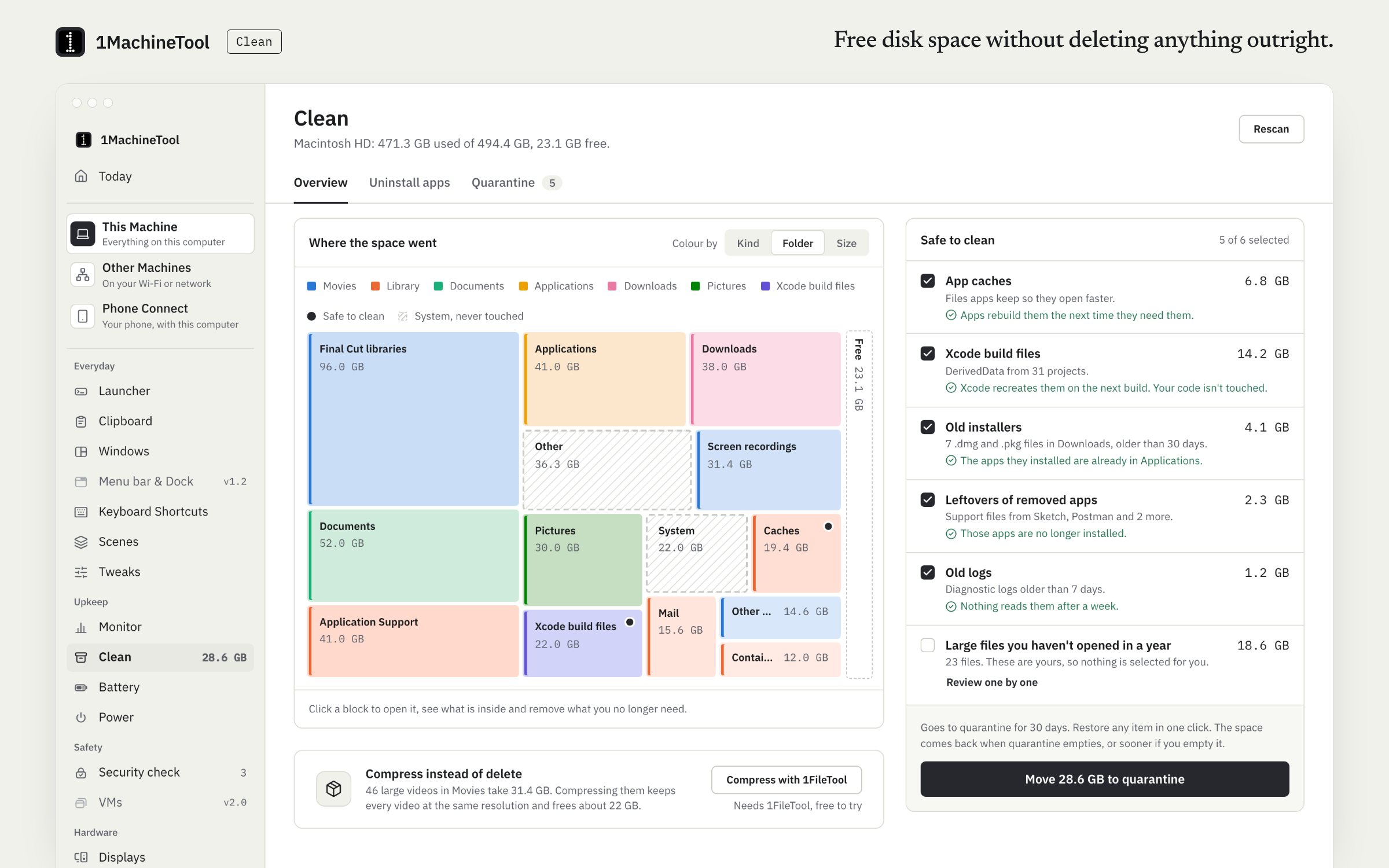
Clean finds what is safe to remove, shows where the space went, and uninstalls apps with their leftovers. Nothing is deleted outright: every removal moves to quarantine and can be restored for 30 days. Free runs 1 cleanup a day.
Checked against 1MachineTool 1.7.0, 18 November 2026
What it does.
- An allow-list scan
- Caches, logs, old installers, leftovers and large files, each with its size and why it is safe. Only places on the allow-list are scanned.
- A map of the space
- See what fills the disk, by folder and by kind.
- Uninstall with leftovers
- Remove an app together with its support files.
- Privacy sweep
- Browser caches, recent-items lists and Quick Look thumbnails. Browsers that are open are left alone.
- Quarantine for 30 days
- Removals are moved, not deleted. Restore any batch within 30 days, or empty quarantine yourself.
- Compress instead
- Hand large files to 1FileTool to compress rather than remove.
- Trash auto-empty
- Have the Trash emptied for you.
How you use it.
- Open Clean and let it scan.
- Tick the categories you want gone. Each says why it is safe.
- Move them to quarantine.
- Restore from quarantine within 30 days if you miss something.
From the terminal
1machine clean scan- Lists what is safe to clean, with sizes. Changes nothing.
1machine clean run app-caches old-logs- Moves those categories to quarantine.
1machine quarantine list- What is in quarantine and when each batch leaves for good.
1machine quarantine restore <batch>- Puts a batch back where it was.
Free and Pro.
Free
1 cleanup a day, Optimize now included. Restoring from quarantine is never counted.
On your computer.
- macOS
- Allow-list scan, space map, uninstall with leftovers, compress via 1FileTool, privacy sweep, trash auto-empty and quarantine with 30-day undo.
- Windows
- Early build. The Clean page in the app says what works there today.
- Linux
- A Linux allow-list (caches, thumbnails, the Trash, old installers), the Trash handled the way the desktop spec says, and the same quarantine. System caches that need root are listed with the command to run.
What it doesn’t do.
- It never touches system paths, cloud-sync folders, other users' files or the top-level folders of your home folder.
- Quarantined files still take space until they expire or you empty quarantine.
- It is not antivirus, and it has no duplicate finder.
Questions.
Will it delete my files?
Never outright. Clean only removes from places on its allow-list, and everything it removes waits 30 days in quarantine, where you can restore it. It leaves your documents, mail, photos and media alone.
Is the cleaner free?
Yes, 1 cleanup a day on Free, with the same 30-day undo. Pro removes the limit.
Is the space freed straight away?
Not all at once. Removed files move to quarantine and stay there for 30 days, so the space comes back when they expire or when you empty quarantine yourself.
Does it scan for malware?
No. Security check runs a checklist that covers the firewall, disk encryption and updates, but 1MachineTool is not antivirus.