Network and Wi-Fi · Safety and hardware
How good your Wi-Fi is, how fast the line is, and who else is on the network.
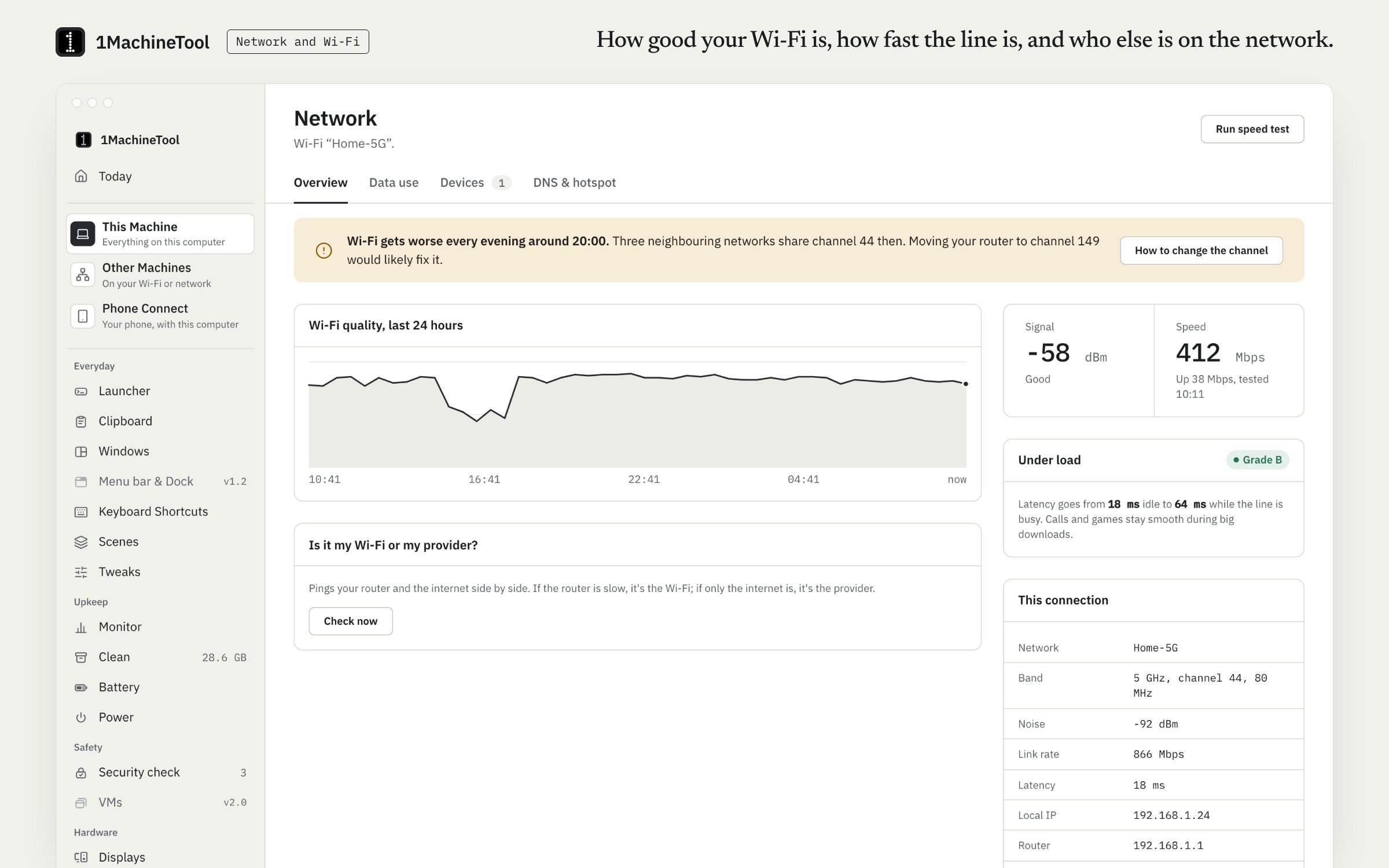
Network shows your Wi-Fi's details and its quality over time, runs a speed test that grades bufferbloat, and tells a Wi-Fi problem from a provider problem. It also lists the devices on your network, the data each app has used and what an app is talking to.
Checked against 1MachineTool 1.7.0, 18 November 2026
What it does.
- Wi-Fi details and history
- The network you are on and how its quality has changed over time, so a bad afternoon shows up as one.
- Speed test with bufferbloat grade
- Download and upload speed, plus a grade from A to F for how much the line lags once it is busy.
- Wi-Fi or provider
- A probe that says whether the slow part is between you and the router or beyond it.
- Data per app
- How much each app has sent and received, and a read-only “what is it talking to?” for any one of them.
- Devices on your network
- The machines on your LAN, with an alert when a new one appears.
- DNS presets
- Pro. Switch the active connection to Cloudflare, Google, Quad9 or your own servers, or back to automatic.
- Hotspot data cap
- Name your phone's hotspot, set a cap for the period and a warning level, and the page keeps count.
How you use it.
- Open Network in the sidebar.
- Run the speed test, or `1machine network --speed`.
- If it is slow, run the probe to see whether the Wi-Fi or the provider is the slow part.
- Ask the launcher why the Wi-Fi is bad, or run `1machine diagnose wifi`, for a finding with its evidence.
From the terminal
1machine network- The connection as it is now.
1machine network --speed- Add a speed test.
1machine network --probe- Add the Wi-Fi-or-provider probe.
1machine dns --set cloudflare- Apply a DNS preset: automatic, cloudflare, google or quad9 (Pro).
1machine diagnose wifi- Ask why the Wi-Fi is bad.
Free and Pro.
Free
Wi-Fi details and history, the speed test, the probe, data per app, devices on the network and the hotspot cap.
Pro
Switching DNS to a preset or to your own servers.
$29 once for one computer, $59 for three, $89 for fiveOn your computer.
- macOS
- Everything above. Reading the Wi-Fi network's name needs Location permission.
- Windows
- Windows is an early build. The Network page in the app says what works there today.
- Linux
- Wi-Fi details from NetworkManager, devices on the network, DNS presets per connection and the TCP data use of your own apps. UDP data use is not counted.
What it doesn’t do.
- It cannot block an app's internet access. On a Mac that needs Apple's Network Extension content filter, which the app does not have; on Linux it needs root. The page offers the read-only “what is it talking to?” instead.
- Changing DNS asks for your admin password.
- On a Mac, the Wi-Fi network's name is hidden until you allow Location.
Questions.
How do I tell whether it is my Wi-Fi or my internet provider?
Run the probe on the Network page, or `1machine network --probe`. It tests the hop to your router and the path beyond it separately and says which one is slow.
What is bufferbloat?
Lag that appears when the connection is busy, because the router queues more data than it can send. Calls and games stutter even though a plain speed test looks fine. The speed test grades it.
Can 1MachineTool block an app from using the internet?
No. On a Mac that needs Apple's Network Extension content filter, which the app does not have. It shows what an app is talking to instead.
Is changing DNS free?
No. Switching DNS, to a preset or to your own servers, is part of Pro. Everything else on the Network page is free.